Real result, fully explained
A Complete Face Swap, From Original Clip to Finished Result
Below is one real face swap produced by VisoPop, shown end to end: the original target clip, the source face photo, and the finished video. It uses our own licensed demo footage — the same media as the homepage demo — so you can judge the actual output before you upload anything of your own.
Silent demo (no spoken audio): pick a target clip, add a source face photo, then see the swapped result with lighting and expression preserved.
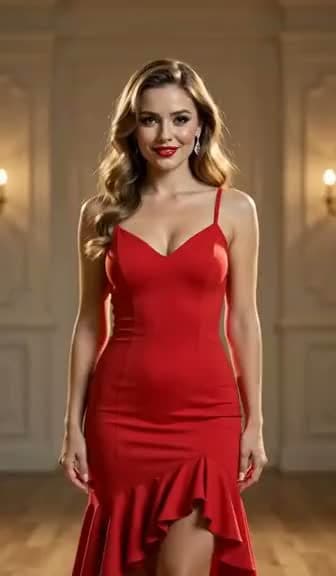
1. Target video
The original clip you want to edit.

2. Source face
A clear photo of the face to apply.
3. Result
Source face swapped onto the target video — lighting and expression preserved.
Silent, looping preview. Click the large result panel to pause or resume.
What you are looking at
The target video is the clip being edited — in this sample, a short shot of a single subject with stable framing and even lighting. Those conditions are deliberate: they are exactly what gives a face-swap model the cleanest frames to work with.
The source photo is one clear, front-facing picture of the face being applied. Only a single photo is needed; the model reconstructs the face across every frame of the video from that one image.
The result is the finished render. Notice that the original scene, body, timing, and background are untouched — only the face has been replaced, with the subject's expressions and lighting carried through to the new face.
How this example was made
- Uploaded the short target clip shown above.
- Added the single source face photo as the face to apply.
- Confirmed the detected face and mapped the source to that person only.
- Generated the swap and reviewed the result at normal playback speed.
- Downloaded the finished, watermark-free video at its original resolution.
The same flow applies to your own media in Create Swap. For scenes with more than one person, see Multiple Face Swap.
A checklist for judging any face-swap result
Whether you use VisoPop or another tool, these are the five things worth watching before you decide a result is good enough to share.
Face-boundary blending
Look closely at the jawline, hairline, and ears. A good swap hides the seam where the new face meets the original head and background, with no visible cut-out edge.
Skin-tone continuity
As the subject moves through light and shadow, the applied face should shift color with the scene instead of staying a flat, mismatched tone.
Eye direction and blinks
The swapped face should keep looking where the original subject looks, and blinks should land at natural moments rather than freezing or double-blinking.
Behavior on head turns
Turns and tilts are the hardest frames. Watch whether the face stays attached and proportionate as the head rotates, instead of sliding or smearing.
Frame-to-frame stability
Scrub through the clip. The result should feel steady, with no flicker, jitter, or sudden identity drift between consecutive frames.
How to get results like this
Source photo: clear and front-facing
Use one sharp, well-lit photo with the face toward the camera, even lighting, and no heavy filters, sunglasses, or hair across the face.
Target clip: face visible most of the time
Choose a segment where the face stays on screen and is not repeatedly covered by hands, props, hair, or fast motion blur.
Match the lighting when you can
A source photo lit from a similar direction to the target scene blends more naturally than one shot under very different light.
Test a short segment first
Run a 2–4 second test before committing to a longer edit. It is the fastest way to judge whether the angle, tone, and motion are a good match.
Recreate this responsibly
This example uses footage we have the right to use. For your own projects, get permission from every identifiable person, avoid impersonation or misleading edits, and label AI-edited clips when they could be mistaken for real. Our Safety & Consent Standards and Privacy Policy explain the rules and our 24-hour deletion policy.
Frequently asked questions
Is this a real output or a marketing mockup?
It is a genuine render produced by VisoPop, using our own licensed demo footage. This is the exact same media shown in the homepage demo, so what you see here is what the tool actually produced — not a hand-edited video.
Why do you only show one example?
We treat user media as private: uploads and results are deleted within 24 hours and are never published or used for promotion. Rather than show customer work without permission, we demonstrate the tool with our own consented demo footage and explain the result in depth.
Can I reproduce this with my own media?
Yes — as long as you have permission from every identifiable person and the rights to the footage. Upload a target clip, add a source photo, map the face, and generate. See our Safety & Consent Standards before you start.
What resolution does the output keep?
VisoPop preserves the original video resolution up to 4K and exports without a watermark. Higher-resolution output may use more credits, which are shown before you generate.
How much would a clip like this cost?
Credits are based on clip length and quality, not on the number of faces. New accounts receive starter credits, and the Pricing page shows current packs and the estimate used before you confirm.
Make your own with consented media
New accounts start with 50 free credits. Check current packs and processing estimates before you generate.